


 By
·
11 minute read
By
·
11 minute read
Manual shipping operations have a way of looking fine — right up until the moment they don't. Volume spikes. A carrier API hiccups. One address field exceeds a character limit and blocks hundreds of labels. Your team spends the next two hours doing by hand what should have been handled automatically.
The old way: copy-paste carrier choices, reprocess failed labels manually, chase customers with last-minute updates, and fix the same errors again and again. The modern way: a repeatable, scalable automation Workflow that pre-assigns carriers, retries failed labels, standardises packaging, notifies customers proactively, and even fixes recipient data errors automatically — before anyone on your team notices there was a problem.
This is the playbook. Five actions to automate now, plus a bonus that turns error handling from a ticket queue into a self-correcting system.
🗝 Key Takeaways
- Every ShippyPro Workflow follows one pattern: Trigger → Conditions → Actions. Master this structure once and you can automate anything — carrier selection, error recovery, packaging, notifications, warehouse notes.
- Carrier Pre-Assignment eliminates "decision drift" at scale. Inconsistent carrier choices across shifts and team members is one of the most common hidden costs in growing ecommerce operations.
- Order Retry is your safety net for carrier downtime. Carrier systems fail temporarily more often than teams admit — automated retry recovers most of these failures without any manual intervention.
- Auto-Fix (Beta) is the leap from faster to self-correcting. It detects recipient data errors, fixes them automatically, and retries label generation — turning the most common shipping blocker into a non-event.
- 2026 compliance pressure makes automation non-negotiable. Tightening customs data requirements and carrier surcharge changes mean "someone will notice" is no longer a viable error-handling strategy.
Why automation matters more in 2026 than it did in 2025
The logistics environment that took effect January 1, 2026 is less forgiving than the one before it. EU customs and security data requirements are tightening — pre-arrival filing expectations under programmes like ICS2 are expanding. Carrier surcharge structures updated again at the start of the year, with FedEx publishing new fee schedules effective early January. Maritime compliance rules also updated January 1st.
None of this is dramatic. That's the point. The risk in 2026 isn't a single catastrophic failure — it's the accumulation of small, invisible failures that compound quietly across thousands of daily orders: an address line that exceeds a carrier's character limit, a state code that doesn't match what the carrier expects, a missing phone number that blocks label creation at 11 PM when no one is watching.
ShippyPro calls these Logistics Blackouts. They don't look like emergencies. They look like a handful of orders in error on a Tuesday morning. But at scale, during peak season, they become the difference between a profitable Q4 and a very expensive one.
Most shipping teams discover Logistics Blackouts reactively — when a customer emails, when a carrier invoice shows unexpected charges, or when a batch of labels fails during the busiest hour of the day. Automated Workflows running on Trigger → Conditions → Actions catch these failures at the source, before they reach the customer or your support queue. If your error-handling process still depends on human attention during peak volume, you're one bad day away from a very expensive problem.
How ShippyPro Automation Workflows work
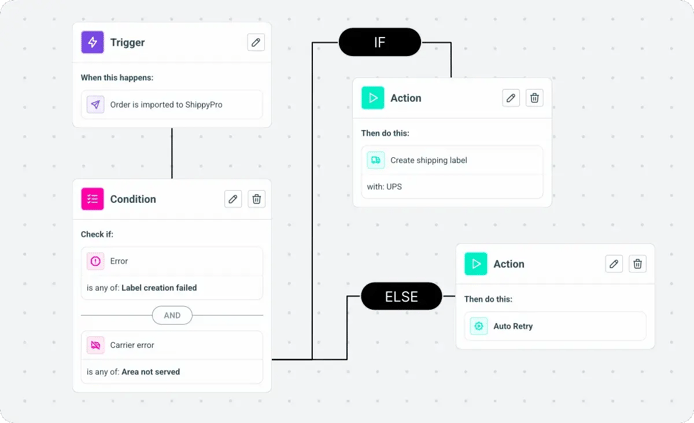
Before the five actions, one structural concept that makes everything else make sense. Every ShippyPro Automation Workflow follows the same three-part pattern — and once you've built one, you've understood the pattern for all of them.
Every Workflow starts with a Trigger. This is the event that fires the automation. Common triggers for the actions in this guide: Order imported (best for pre-shipment standardisation), Order in error (best for reactive fixes and retries), and Tracking status updated (best for proactive customer notifications).
Conditions are optional but this is where your shipping strategy lives. Filter by destination country, store, SKU, weight, payment method, order value, carrier, or error type. The more precisely you define your conditions, the more surgical your automation — and the fewer edge cases you need to handle manually.
Every Workflow must end with at least one Action. This is the automated task: pre-assign a carrier, retry a failed order, add parcel dimensions, send a notification, write a warehouse note, or trigger Auto-Fix. After saving, monitor executions and impacted orders in ShippyPro's Automation Logs view.
Action 1: Carrier Pre-Assignment — stop decision drift at scale
Carrier selection is one of the highest-frequency decisions in any shipping operation. At 200 orders per day, your team is making that decision 200 times — and the answer varies depending on who's working, how busy it is, and whether anyone remembered the rule that was agreed in last month's ops meeting. This is decision drift. It's invisible on any individual order. It's expensive across a month of shipments.
ShippyPro's Pre-assign carrier Action automatically assigns a selected carrier to matching orders the moment they import, making the assignment visible in Ready to Ship and available for filtering and batch processing. No decision required. No variation between shifts.

| Trigger | Condition | Action | What it prevents |
|---|---|---|---|
| Order imported | Destination = IT, Payment = COD | Pre-assign BRT | Wrong carrier for COD Italy orders |
| Order imported | Destination = DE, Weight > 5kg | Pre-assign DHL Express | Lightweight carrier used on heavy parcels |
| Order imported | Store = Shopify ES, Destination = ES | Pre-assign Correos | Inconsistent Spain domestic routing |
| Order imported | Order value > €500 | Pre-assign FedEx (signature required) | High-value orders shipped without signature |
The secondary benefit is speed. Pre-assigned orders batch more cleanly — all BRT orders together, all DHL together — which makes label generation and carrier handoff faster without any additional process change. Connect carrier pre-assignment to ShippyPro's AI Shipping Automation for the full rules engine.
Assigning a carrier at import rather than at label creation means carrier-specific field validation runs earlier in the process. Address format issues, missing phone numbers, and postal code mismatches surface as errors before the order reaches the label queue — when they're easier and cheaper to fix than after a batch has already started processing.
Action 2: Order Retry — automate your recovery from carrier downtime
Carrier systems fail temporarily more often than shipping teams admit. A 15-minute API outage at DHL or a transient timeout at UPS creates a batch of orders in error that someone has to manually reprocess — usually at the worst possible moment, during peak fulfillment hours when your team has the least capacity to deal with it.
ShippyPro's Retry order Action reprocesses failed orders automatically, with a configurable maximum retry count of 1–5 attempts. For system errors specifically — temporary carrier downtime, timeout responses, transient API failures — automated retry resolves the majority without any human intervention.
Carrier API fails at 9 AM. 47 orders land in error. Someone notices at 10:30 AM. Manual investigation begins — which errors are transient vs. data problems? Team spends 90 minutes reprocessing. Carrier pickup cut-off is at noon. 12 orders miss the cut-off. Customer complaints follow. This happens every time there's a carrier outage.
Carrier API fails at 9 AM. Automation detects orders in error with error type = System error. Retry Workflow fires automatically at intervals. By 9:20 AM, when the carrier API recovers, all affected orders have retried and processed successfully. No manual intervention. No missed cut-offs. No one on your team knows it happened.
Set your initial maximum retry count to 3. After two weeks, check your Automation Logs — if you're seeing orders that required all three retries to resolve, the underlying issue is likely not a transient carrier problem but a data or configuration issue that needs investigating. If most orders resolve on retry 1 or 2, you have clean automation. Adjust the count based on what the logs show, not what feels right intuitively. Don't retry everything — filter by System error type so you don't loop on data-quality issues that need a human fix first.
Action 3: Add Parcel — standardise packaging and end surcharge surprises
Dimensional weight charges are one of the most common hidden costs in ecommerce shipping. Carriers charge based on package volume rather than actual weight — whichever is higher. If your team is manually deciding which box to use for each order, you're introducing packaging inconsistency that translates directly into dimensional weight surcharges, additional handling fees, and slower pick-and-pack decisions.
ShippyPro's Add parcels Action assigns predefined parcel dimensions to orders automatically at import — the right box for the right product, every time, without a fulfillment team member making the decision.
.gif?width=800&height=450&name=AUT%20-%20Select%20parcel%20size%20(1).gif)
| Packaging Problem | Workflow Fix | Surcharge Prevented |
|---|---|---|
| Team using oversized box for small items | SKU-based parcel assignment at import | Dimensional weight charges |
| No standard box for multi-item orders | Quantity-based multi-parcel logic | Additional handling fees |
| Heavy items assigned lightweight packaging | Weight condition → correct box assignment | Carrier rejection surcharges |
| Inconsistent dimensions across shifts | Automated assignment from My Packages library | Rate discrepancy and re-billing |
Action 4: Send Notification — reduce WISMO without overwhelming customers
WISMO — Where Is My Order — is the single largest category of ecommerce support tickets. It accounts for up to 80% of post-purchase inquiries at most merchants, and almost every single one of them is preventable. The customer contacts support because they didn't receive a proactive update. The fix is not better support — it's better communication.
ShippyPro's notification system sends the right message at the right moment across Email, SMS, and WhatsApp — triggered automatically by real carrier tracking events through ShippyPro Track & Trace. The key is sending only what customers actually need, not every possible status update.
| Notification Event | Best Channel | Why | WISMO Prevention |
|---|---|---|---|
| Label created / Shipped | Reference info customers keep and return to | Eliminates "has it shipped?" tickets | |
| Out for delivery | SMS or WhatsApp | Time-sensitive — needs to be seen within minutes | Reduces failed delivery attempts by up to 35% |
| Delivered | Confirmation + review request opportunity | Eliminates "did it arrive?" tickets | |
| Exception / Delay | SMS or WhatsApp | Urgent — customer needs to know before they ask | Prevents frustration-driven support contact |
Some carriers already send their own SMS updates to customers by default. If you activate ShippyPro SMS or WhatsApp notifications without disabling the carrier's native SMS, your customer receives duplicate messages for the same event — which damages the experience you're trying to improve. ShippyPro's notification documentation specifically flags this: disable carrier SMS options in your carrier account settings before going live with ShippyPro notifications.
Action 5: Add Note — turn tribal knowledge into repeatable instructions
Every warehouse has institutional knowledge that lives in people's heads. The rule about double-boxing orders over €200. The reminder that SKU "GLASS-01" needs extra void fill. The instruction that COD orders need a paper invoice in the box. This knowledge works fine when the same experienced person handles every order. It breaks down completely during peak season, shift changes, new staff onboarding, or high-volume days when there simply isn't time to check.
ShippyPro's Add note Action writes internal instructions directly to the order automatically at import — visible to your fulfillment team before they touch the package, without anyone needing to check a separate system or remember a rule.

Example Workflows that turn tribal knowledge into automated instructions: Trigger = Order imported, Condition = Order value > €200 OR SKU contains "FRAGILE", Action = Add note: "Double-box + add void fill; QC photo before dispatch." Or: Trigger = Order imported, Condition = Payment method = COD, Action = Add note: "COD order — include paper invoice, confirm cash amount with driver." Or: Trigger = Order imported, Condition = SKU contains "GLASS", Action = Add note: "Fragile — upright only, max 2 per box, fragile tape on all sides."
Chain multiple Actions in one Workflow to handle everything at import in a single pass. Trigger = Order imported, Condition = Destination IT + Payment COD → Action 1: Pre-assign BRT → Action 2: Add note "COD — verify amount before handoff." One Workflow, two automated actions, zero manual decisions. Connect to ShippyPro's Shipping Platform to manage all your Workflows from a single dashboard.
Bonus: Auto-Fix (Beta) — your self-healing shipping operation
The five actions above make your shipping operation faster and more consistent. Auto-Fix makes it self-correcting.
Recipient data errors are the most common cause of label creation failures — address fields that exceed carrier character limits, state codes that don't match carrier expectations, postal codes with formatting issues. These are not complex problems. They're repetitive, predictable, and fixable. But without automation they create a ticket queue: someone identifies the error, looks up the correct format, manually edits the order, retries the label. Multiplied across dozens of orders on a busy day, this is a serious operational drag.
.gif?width=800&height=450&name=AUT%20-%20Correct%20Address%20(1).gif)
ShippyPro's Autofix recipient info Action changes this entirely. The Workflow: Trigger = Order in error, Action = Autofix recipient info. When an order fails with a recipient data error, the automation detects which fields are problematic — company name, address line, city, state, postal code — corrects them automatically, and retries label generation up to two times without any human intervention.
| Error Type | Manual Process | Auto-Fix Process | Time Saved |
|---|---|---|---|
| Address line too long | Agent finds order, edits field, retries | Auto-Fix truncates and retries automatically | 3–5 min per order |
| State code format mismatch | Agent checks carrier format, corrects, retries | Auto-Fix standardises format and retries | 4–8 min per order |
| Postal code formatting issue | Agent identifies correct format, edits, retries | Auto-Fix corrects format and retries | 3–6 min per order |
| Missing or invalid city field | Agent looks up correct value, edits, retries | Auto-Fix corrects from postal data and retries | 5–10 min per order |
2026 peak dates: when your automation needs to be running
Automation Workflows should be live and tested before volume peaks — not configured during them. Build your Workflows now, run them on normal volume for two weeks to confirm they're working correctly, then enter peak season with a system that can handle 3–5× normal volume without any additional manual effort.
| Peak Event | 2026 Date | Key Automation Priority | Prepare By |
|---|---|---|---|
| Easter | 5 April 2026 | Cross-border pre-assignment, exception notifications | Mid-March |
| Mother's Day (US) | 10 May 2026 | Gift order notes, delivery notifications | Late April |
| Singles' Day | 11 Nov 2026 | Cross-border carrier pre-assignment, parcel rules | Mid-October |
| Black Friday | 27 Nov 2026 | All five actions + Auto-Fix — full Workflow coverage | Early October |
| Cyber Monday | 30 Nov 2026 | Order Retry critical — carrier APIs under strain | Early October |
AI Shipping Automation
Build Trigger → Conditions → Actions Workflows for carrier pre-assignment, order retry, parcel assignment, and more — visual builder, no code required.
Build Your First Workflow →Track & Trace
Automated branded notifications via Email, SMS, and WhatsApp triggered by real carrier events — reducing WISMO tickets by up to 80% across 160+ integrated carriers.
Explore Notifications →Shipping Platform
Central dashboard for label generation, carrier management, and Workflow execution — connecting 160+ carriers and 80+ ecommerce platforms in one place.
Explore the Platform →Easy Return
Self-service branded returns portal with automatic label generation and inventory triggers — extend your Workflow automation into reverse logistics.
Automate Returns →API Documentation
Connect your OMS, WMS, or ERP to ShippyPro programmatically — full API documentation for automated order sync, label generation, and tracking integration.
View API Docs →Resources & Guides
Practical guides for ecommerce operations teams on shipping automation, carrier management, peak season preparation, and post-purchase experience.
Browse Resources →What is shipping automation?
Shipping automation uses rule-based Workflows — structured as Trigger → Conditions → Actions — to perform repetitive shipping tasks automatically. In ShippyPro, this means actions like carrier pre-assignment, order retry on failure, parcel dimension assignment, customer notifications, and warehouse notes all execute without manual intervention, triggered by order events and carrier tracking updates in real time.
What should I automate first?
Start with Carrier Pre-Assignment and Add Parcel — both trigger at order import and prevent the downstream errors that cause label failures, surcharge surprises, and inconsistent fulfillment. Then add Order Retry to handle carrier downtime automatically. Once those three are stable and running cleanly for two weeks, activate Send Notification and Add Note. Build incrementally — one Workflow live and tested beats five half-configured.
How does ShippyPro handle orders in error?
ShippyPro routes failed label creation orders to a dedicated Errors area, categorises them by error type (system errors, data errors, carrier-specific errors), and provides documented solutions for each category. Some errors — particularly transient system errors and recipient data formatting issues — can be resolved automatically through Automation Workflows using the Retry order and Autofix recipient info Actions. Errors requiring data correction surface clearly for manual review.
What is Auto-Fix (Beta) in ShippyPro?
Auto-Fix (Beta) is a Workflow Action called "Autofix recipient info" that activates when an order lands in error due to recipient data issues. It detects which fields are problematic — address line length, state code format, postal code formatting, city field — corrects them automatically based on carrier requirements, and retries label generation up to two times. It turns the most common, repetitive shipping blocker from a manual ticket into an automated resolution, with no human intervention required for the majority of recipient data errors.
Can I automate shipping if I use the API?
Yes. ShippyPro's API supports full programmatic integration for OMS, WMS, and ERP systems — automated order sync, label generation, tracking updates, and event webhooks. Automation Workflows run on top of the same order and tracking data whether orders arrive via API or through native ecommerce platform integrations. See the ShippyPro API documentation for integration reference and authentication details.
Build once. Ship better. Scale without limits.
Start with Carrier Pre-Assignment and Order Retry — most merchants are live with their first Workflow in under an hour. No credit card required.
Start Free with ShippyPro →
Product Manager at ShippyPro. I spend my days building the tools that help ecommerce merchants automate their shipping operations and reduce post-purchase friction — and most of my best ideas come from talking directly to merchants about what breaks when order volume starts to scale.